AI-Assisted Frontend Development
Build real visualizations in Vue, Svelte, and React with AI assistance.
Module 0 + prerequisites are free with an account.
Sign in to start freeFounding price during launch window. One-time payment, lifetime access.
See it live
Click any tile to play with the deployed reference app you'll learn to build toward.
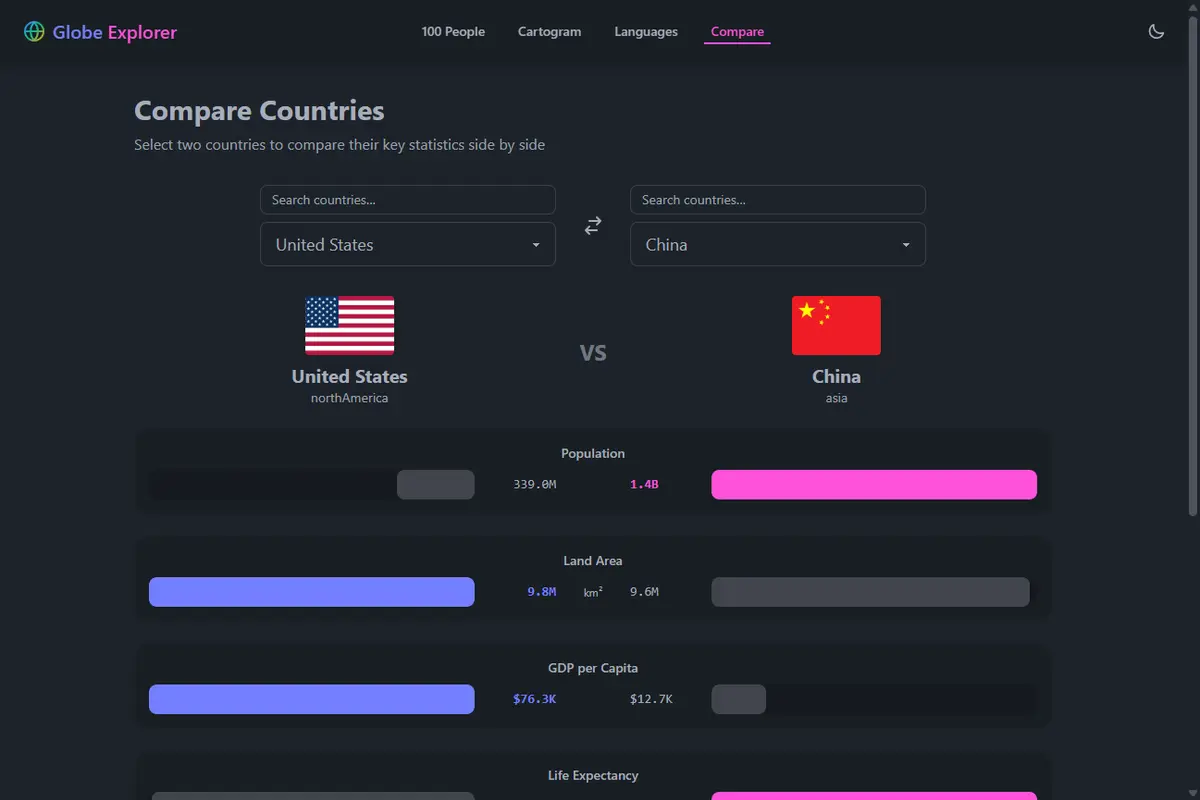
Compare Countries
Pick two countries; see them side-by-side across five metrics — population, land area, GDP per capita, life expectancy, internet access.
Live demo
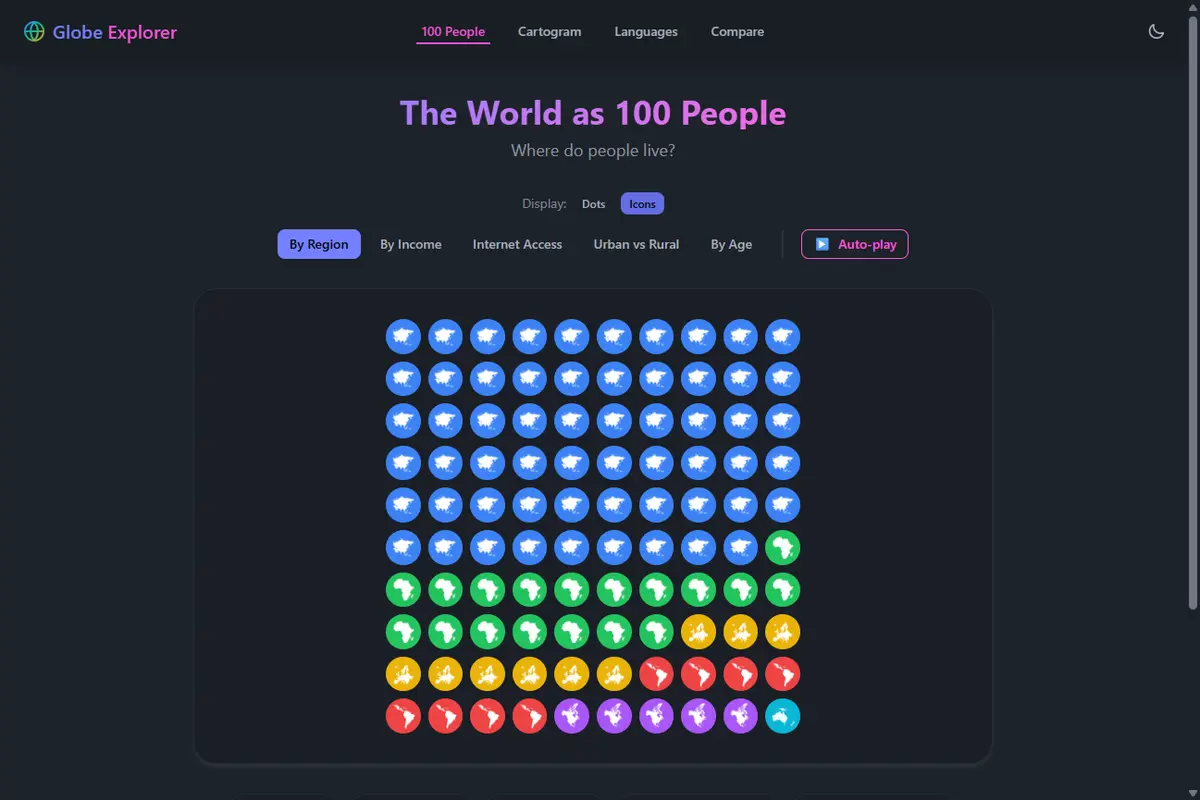
The World as 100 People
Show every person in the world as one of 100 markers. Switch modes to recolor by region, income, internet access, urban vs rural, or age; toggle the Dots / Icons display.
Live demo
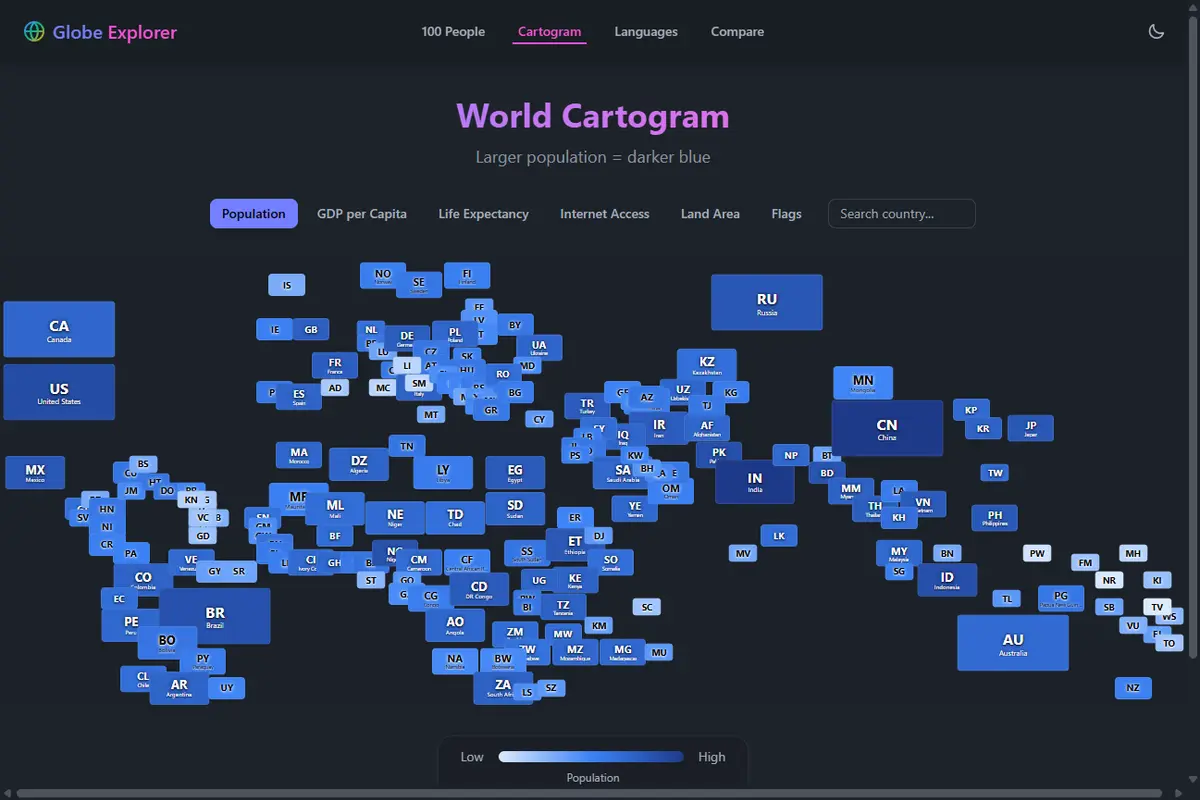
Cartogram
Tiles sized by land area; recolor every country by population, GDP, life expectancy, internet access, area, or flag. Hover for details.
Live demo
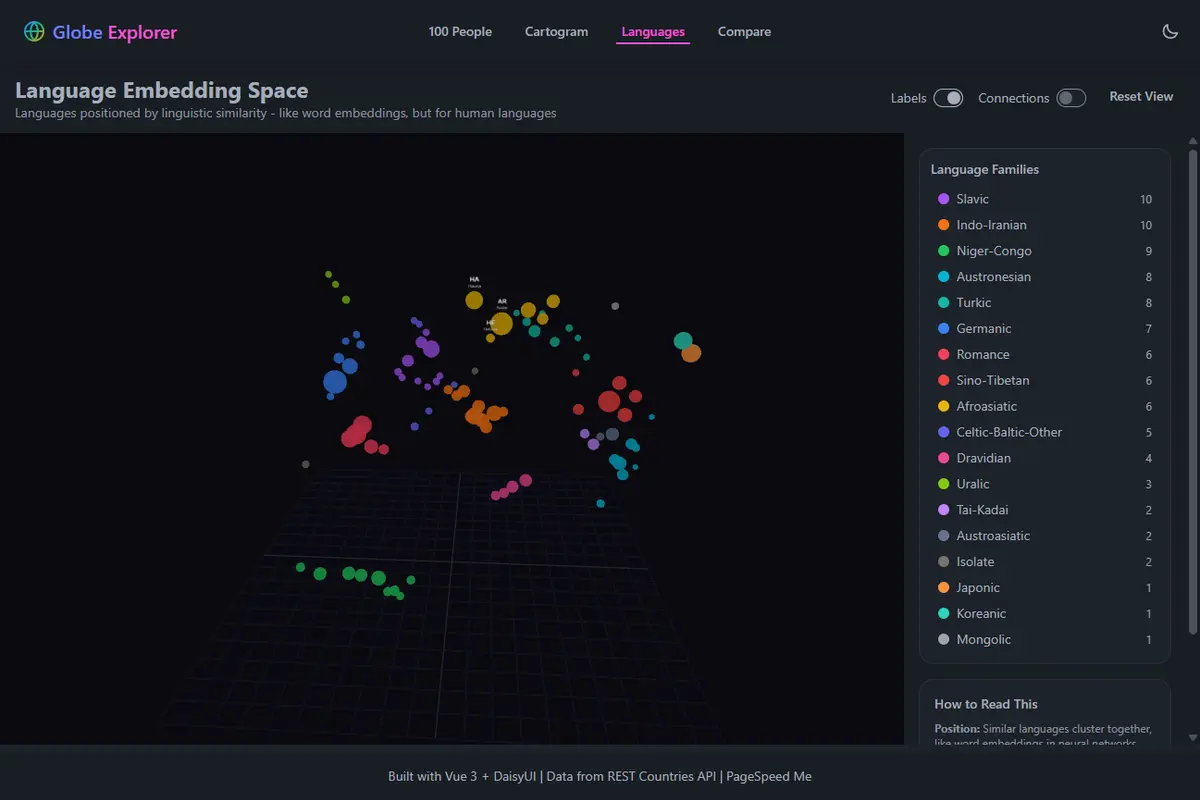
Language Space
Plot every world language as a 3D sphere colored by family — Slavic, Germanic, Romance. Bigger sphere, more speakers.
Live demo
Two-minute walkthrough
See the course end-to-end before you buy.
Why this course
Three things this course does that most AI-coding and most framework-comparison courses don't.
One real app as the target, your framework, all three on the page
Build toward Globe Explorer with AI as your collaborator — a 4-visualization production-quality reference app deployed live, with its Vue source open on GitHub. Each lesson teaches one technique with focused per-framework slices in Vue, Svelte, and React side by side; the assembly into your own app is yours to do, with the captured prompts + the public source as your reference.
AI workflow patterns that survive the model treadmill
Bring your own AI tab — ChatGPT, Claude, Gemini, whatever you already pay for. The loop you learn here outlasts the model you use it with. Prompts library and reference cards ship with the course.
A capstone with a real submission flow
Path A: a guided diversity audit and silhouettes pivot. Path B: invent your own visualization. Either way — real form, real submission, real rubric. Not "build something cool and post in a Discord."
What you'll build
Four production-quality visualizations to build yourself with AI assistance, with focused per-framework implementation slices in Vue, Svelte, and React side by side. The complete deployed Globe Explorer (Vue source open on GitHub, MIT) is the reference; the lessons teach the workflow that gets you there.
Compare Countries
Two dropdowns, five metrics, side-by-side progress bars. The easy-start that locks the lesson rhythm.
The World as 100 People
Categorical dot grid, mode switcher, animated storytelling auto-play. Categorical data made legible.
Cartogram
Geographic tile layout for 195 countries. Accessible color modes, hover tooltips, modal details, responsive scaling.
Language Space
Three.js scene, language spheres positioned by embedding similarity, raycasting interaction, family-filtered connections.
Capstone — your own thing
Path A (guided diversity audit + silhouettes pivot) or Path B (invent your own). Real form, real submission, real rubric. The capstone is the proof you can do this work.
Workshop training at self-paced pricing
Instructor-led AI coding workshops in 2025–2026 typically charge $230 (intro bootcamp) to $7,400 (team workshop) for two days of training. Many of them teach the workflow rather than delivering complete source — this course belongs in the same category at self-paced economics. Compare the format, the price, and what's actually delivered.
| Typical AI Coding Workshop | This Course | |
|---|---|---|
| Format | 2-day live cohort, fixed dates | Self-paced, lifetime access |
| Price (individual) | $230 – ~$1,000 / seat | $100 founding / $150 standard |
| Price (team) | ~$1,500 – $7,400 / 5-seat team | $100 founding / $150 standard (× number of seats) |
| Hours | ~12–16 hrs of live contact time, fixed dates | ~10–11 hrs of lessons, you pace it |
| Frameworks covered | Usually one (or framework-agnostic) | Vue, React, Svelte side by side |
| Final source delivered | No — workflow only | No — workflow + reference repo (Vue source open MIT on GitHub) |
| Miss a session / revisit a year later | Recording window or not at all | Lifetime access, replay anytime |
| Capstone with real rubric | Sometimes | Yes — Path A guided + Path B creative, real submission form |
Workshop prices last surveyed 2026-05-22 at the operators' published rates: Wellmade Academy Brussels 2-day individual workshop at €900; Singapore "vibe coding" 2-day bootcamp at S$300 (S$ ≈ $0.78 USD as of survey date) profiled by CNBC; Instructa.ai 2-day team Agentic Coding Workshop at €6,850 (5 seats, €850 per extra seat). Click any of the three to re-check the current price for yourself before deciding.
What you get
- All four prerequisite tracks (HTML → CSS → JavaScript → Frameworks)
- Module 0: setup & mindset
- The 2-minute walkthrough video
- Public Globe Explorer reference app to poke at
- Modules 1–4: lesson-by-lesson AI prompts, responses, and focused per-framework code slices for each of the four visualizations
- Vue, Svelte, and React versions of each lesson's technique, side by side
- Module 5 capstone with submission form + Path A / Path B rubrics
- Bonus reference pack (prompts library + 4 cheat sheets)
- Fixes & improvements as we ship them
What you get vs what you build: the course teaches the workflow + ships focused per-framework slices for each technique. The assembly into a finished app is yours to do, with the captured prompts and the deployed Globe Explorer (Vue source open on GitHub, MIT) as your reference. This is a guided workshop, not a code-vending machine.
Why you can trust this course
The reference app you'll learn from and build toward is real, deployed, and open source. Every claim below is something you can click to verify.
- →Globe Explorer live demo — the finished app, deployed on Cloudflare Pages, scoring 100s on mobile PageSpeed at last check.
- →Public source on GitHub — MIT-licensed. Read every line, run the tests yourself (172 passing, 90s line coverage at last check).
- →Free Module 0 — the AI-mindset, tool setup, and a tour of the finished app. Sign in to read and track progress; no payment required.
- →Free prerequisites — four optional refresher tracks (HTML, CSS, JavaScript, Frameworks) so you can sample the teaching style before paying.
Who built this
Daniel Tofan — an engineer, not a full-time instructor. I built Globe Explorer (the reference app the course uses as the build target — open-source Vue, public MIT-licensed source), ship a ton of educational material and assessment problems on my chemistry tutoring platform, and run codecrank.ai, where a bunch more demos live. This course was assembled the same way I do the rest of the work — engineer at the wheel, AI in the toolchain, every lesson and code path reviewed before shipping. You're not getting curriculum from a teaching company; you're getting the workflow I actually use, written down by the person using it.
Prerequisites
OptionalFour optional refresher tracks that compound: HTML structure, CSS layout, JavaScript interactivity, then framework patterns. Skip the ones you already know.
Track A: HTML Essentials
Build a solid HTML foundation. From blank file to multi-page site.
Track B: CSS Essentials
Master layouts, flexbox, grid, and responsive design.
Track C: JavaScript Essentials
Variables, functions, DOM manipulation, and async patterns.
Track D: Framework Fundamentals
Vue, Svelte, and React side-by-side. Same problems, different solutions.
Modules
6 modulesThe setup module is free; Modules 1–5 unlock with your purchase.
Module 0: Setup & Mindset
FreeAI-assisted development as a real skill. Tools, workflow, what you'll build.
Module 1: Compare Countries
Two dropdowns, five metrics, side-by-side. The easy-start module.
Module 2: 100 People
If the world were 100 people. Five view modes, wave animations, storytelling.
Module 3: Cartogram
195 countries as tiles, sized by area, colored by metric. Search, modal, WCAG contrast.
Module 4: Language Space
50+ languages in 3D. Three.js, raycasting, embeddings. The wow finale.
Module 5: Capstone
Reflect on the v2 design journey (Path A) or invent your own visualization (Path B). Methodology + submission flow + creative-path stretch.
Bonus Reference
IncludedReference cards and the prompts library compiled across Modules 1-4. Use them alongside the lessons or as standalone references after you finish.
Prompt Structure Cheat Sheet
The shape every effective course prompt has, plus the anti-patterns to avoid
Course Prompts Library
Every authored prompt across Modules 1-4, organized for reference and adaptation
AI Tool Comparison
Reference distillation of Module 0 lesson 2: which tool for which kind of work, with cost and tradeoff notes
Framework Syntax Cheat Sheet
Vue 3.5, Svelte 5, React 19 side-by-side for every pattern the course uses
Globe Explorer Architecture Diagram
What you're building toward, layer by layer: data, features, composition, build, deploy
Who this is for
- Frontend devs who feel slow with AI and want to fix that.
- Engineers tired of surface-level "Vue vs React" comparisons and ready to see them on a real, finished app.
- People who've shipped a few CRUD apps and want to build something they'd actually demo.
- Engineers picking a framework for a real project — you'll see Vue, React, and Svelte solve the same problem side by side instead of cherry-picked toy examples, then pick with confidence.
- Newer devs — start with the four free prereq tracks (HTML, CSS, JavaScript, frameworks), then continue into Module 0 and the paid modules. You don't need to be senior to start; you just need to want to ship.
Not the right fit if
- You want copy-paste boilerplate. This teaches thinking with AI, not prompting at it.
- You want a quick skim, not a build. This is a multi-week course; if 12–15 hours of focused work isn't the time budget, the free Module 0 + walkthrough is the right size.
- You already work with AI tools every day and your prompting + iteration loop is dialed in. The course teaches the shift to AI-assisted coding; if you're already past that shift, you'd be reading what you already practice.
Common questions
Is this a subscription?
No. One-time payment, lifetime access. Fixes and improvements ship to all buyers at no extra cost.
What's the refund policy?
Lab courses are non-refundable. The free portion — prerequisites + Module 0 + walkthrough video + public reference app — is the trial. Use it before you buy.
Do I need to pick a framework upfront?
No. Every paid lesson ships a focused per-framework code slice in Vue, Svelte, and React side by side, so you can pick one as you go or compare all three. The capstone is single-framework.
Do I get the complete final source for Globe Explorer in all three frameworks?
No — and that's intentional. The course teaches the workflow to build it with AI; the deployed Globe Explorer + its open MIT-licensed Vue source is the complete reference. The lessons ship focused per-framework code slices for each technique (Vue, React, Svelte) plus the captured AI prompts + responses, so you build the React and Svelte versions yourself with AI assistance — same way the course was assembled.
One exception: the starter repo ships Module 1's Compare feature pre-assembled in all three frameworks (covering Lessons 1–4) as a cross-framework parity demo. Clone, npm install, npm run dev, and you see the same UI render in Vue, React, and Svelte. Diff the three implementations side by side to verify the translation is real before you commit to a framework.
What parts of Globe Explorer does the course teach vs leave to me?
Modules 1–4 teach the four visualization components (Compare, 100 People, Cartogram, Language Space) with per-framework code slices for each lesson's technique. The starter repo (forkable) ships the app shell, router, Vite + Tailwind + DaisyUI config, the hand-curated datasets (regions, countries, languages), the icon set, and Vitest preconfigured — for all three frameworks (Vue, React, Svelte). The lessons drop visualization components into that scaffold. The public GE Vue repo (MIT, open) is your line-by-line reference for the finished Vue version; the React and Svelte versions are yours to assemble from the per-lesson slices using AI as your collaborator. The course optimizes for the parts AI actually helps with — the visualization components — not boilerplate you can fork-and-go.
Do I need an AI tool of my own?
Yes — bring your own. Module 0 explains the pattern. Any chat-based AI works (ChatGPT, Claude, Gemini, etc.). No keys required from us, no extra subscription.
How long does it take?
About 7 hours of paid Modules 1-4 lessons, plus a 3–4-hour capstone — roughly 10-11 hours total. Faster if you skip the optional stretch lessons; longer if you take all four prerequisite tracks. Pace yourself.
Will my work be public?
Only if you opt in and we judge it worthy to showcase — we can't post every submission, for obvious reasons. The capstone submission form has a showcase opt-in checkbox; it's off by default. Your account, your work.